The session starts in twenty minutes and the full-backs are still bunching inside. Last week's sheet shows a 4-3-3, but it doesn't show who receives when the near-side centre-back is closed down, or when the ball should go to the far winger. A soccer tactics board app earns its place only if the picture asks that question before anyone jogs out.
TFA Tactics Board, the free tactics board from Tactical Football Analysis, runs in the browser. A coach can place players, mark one pass and one run, and write the decision in a note. The picture still has to be checked against what players do once the ball is rolling.
Table of Contents
Free Board Tools and What Membership Adds
A basic diagram needs nothing beyond the free board. It opens in the browser with no software download, and it adapts to desktop, tablet and mobile screens. Player positioning, the ball, passing arrows, running movements, notes and PNG export are free. So are the formations 4-3-3, 4-2-3-1, 3-2-5, 4-4-2, 3-4-3 and 5-4-1, plus the 11v11 full-size pitch.
The £9 membership is a different toolkit, not a coat of paint on the same board. It adds dribbles, curves, shots, freehand drawing, zones, spotlights, focused pitch views, extra phases, video export, editable files, sharing, embedding and portrait orientation. Member formations are 3-3-2, 2-3-1, 3-2-1 and 1-2-1. Small-sided pitches and training grids sit on the same side of the line. Member tools become available after TFA Member Sign In, once the email on the paid membership is verified.
Feature | Free board | TFA membership (£9) |
|---|---|---|
Formation library | 4-3-3, 4-2-3-1, 3-2-5, 4-4-2, 3-4-3, 5-4-1 | Adds 3-3-2, 2-3-1, 3-2-1, 1-2-1 |
Pitch format | 11v11 full-size | Adds 9v9, 7v7, 5v5 and training grids |
Ball, passing and run arrows | Included | Adds dribbles, curves, shots and freehand drawing |
Zones and spotlights | Not included | Included, with defensive, middle and attacking pitch views |
Phases and movement | One position per diagram | Multiple phases with automatically interpolated movement |
Saving | Autosave in the current browser | Saved boards, editable project files |
Export | PNG image | Adds video export and editable file import and export |
Sharing | Not included | Share links and embedding |
Price | Free | £9 membership |
A coach drawing one set-piece on a full pitch is covered by the free board. A coach building a three-phase sequence for a 7v7 session needs membership. Check the live site for current prices and access before subscribing.
How to Build a Diagram in Four Steps
Start with the shape players already share, then add one action. Arrows drawn before positions are fixed usually describe a pass nobody is standing in place to play.
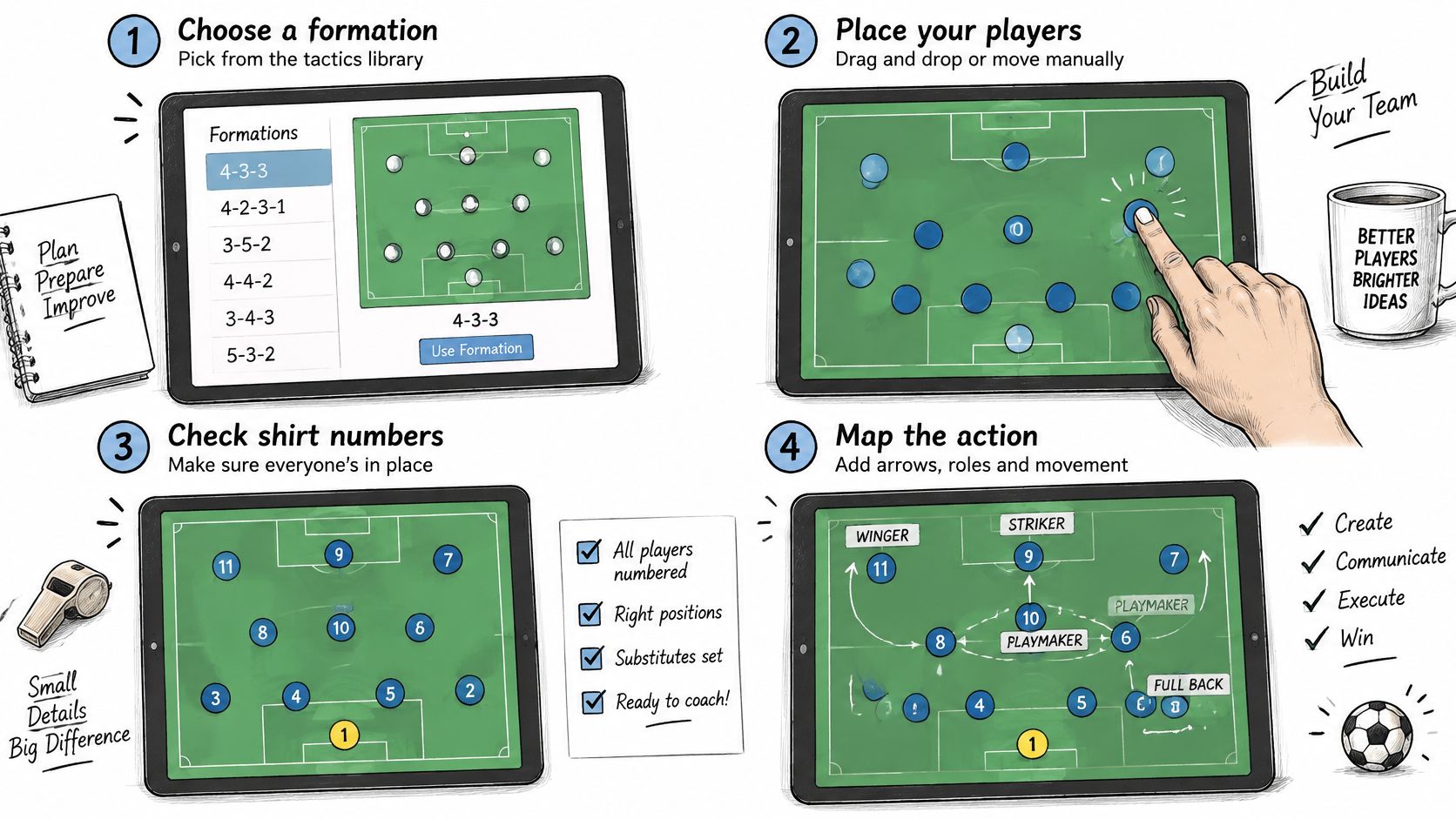
The illustration below shows the planning order. It isn't a checked match diagram, so every number, spot and arrow still needs a manual look before it goes to players.
Choose the starting shape
Choose the starting shape. Pick a formation from the library or place players by hand for either team. Check shirt numbers before anything else goes on the pitch. A formation is a shared picture of defensive, midfield and attacking jobs, so it has to be right before a pass is drawn.
Map the football action. Place the ball, then add a pass arrow and a run arrow from the ball carrier outwards. Give each arrow one idea. A second idea on the same arrow makes the first one unreadable.
Add the coaching detail. Label the lane or zone, write a short note for each key player's job, and set team colours so the two sides separate at a glance. Available drawing colours are white, TFA pink, analysis yellow, sky blue and green.
Export and communicate. Save a PNG for a handout or a message to staff. The board works in any modern browser with no installation, and the same workspace fits a laptop, a tablet or a phone. A larger screen is more comfortable for placing numbers.
Could a player who has never seen the board say who receives the ball and where the next pass goes? If the answer is no, the arrows are decoration.
Treat the diagram as an illustration. Before it is published or pinned in the changing room, check every player number, every starting spot and the meaning of every arrow by hand.
Adding Movement, Phases and Coaching Notes
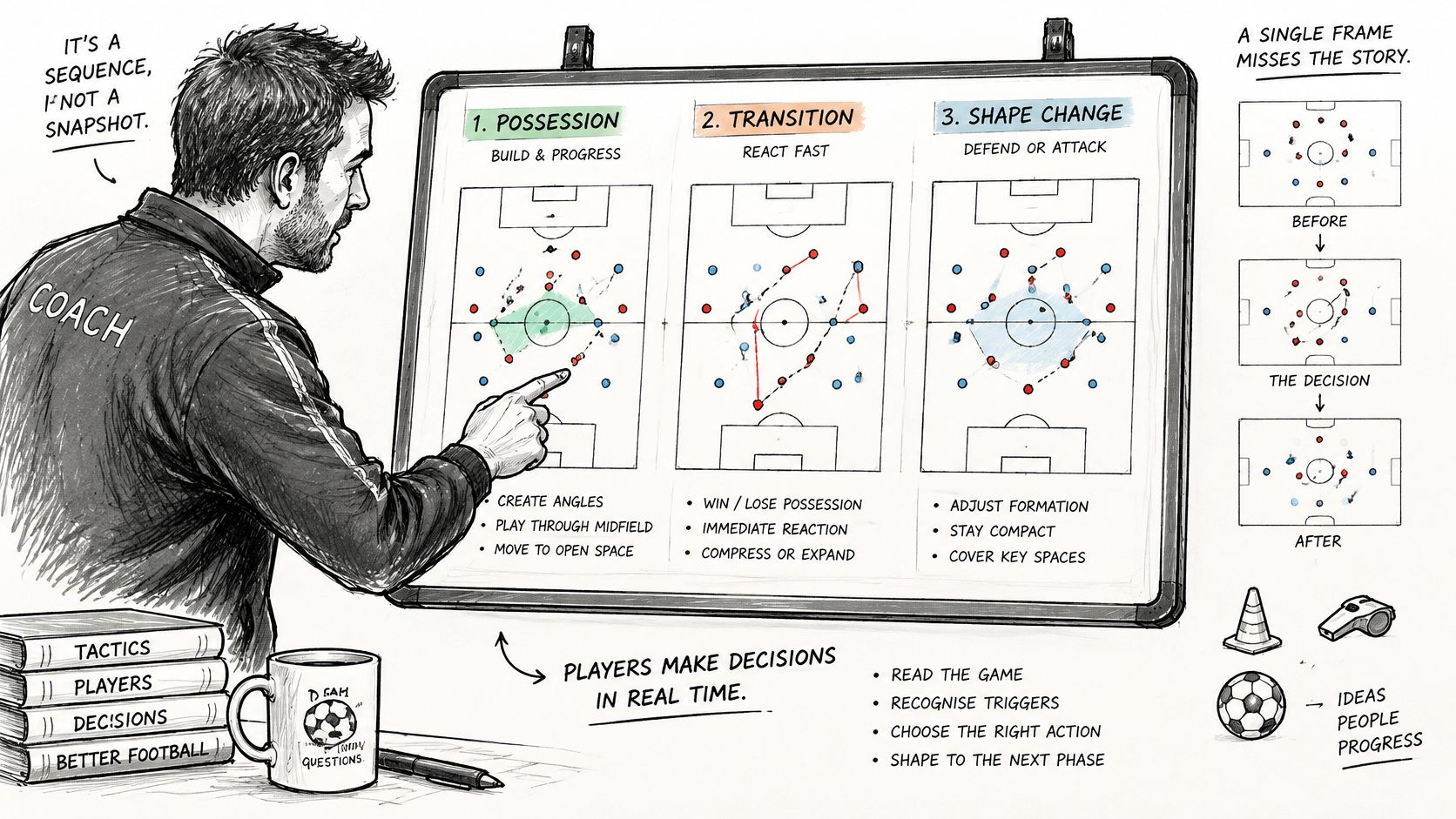
One frame misses the decision because the team in possession doesn't stay in one state. In a season of tracking data from a 20-team professional league, build-up accounted for 47% of reported phase observations and the mid-block for 39%, and a phase-classification model separated those situations with an average F1 score of about 0.76, as set out in a 2023 tracking study. A fixed 4-3-3 label can't carry that change.
On the free board, arrows and notes can show one moment. Membership adds further phases, and frames interpolate player movement automatically, so positions set in each phase animate between them without every step being drawn. Members can also keep those sequences in a board library and switch the view to the defensive half, the middle third or the attacking half so the picture matches the phase.
A three-phase build-up
This is an example, not a session plan.
Phase one. The ball is with number 4 and number 6 drops to receive. Note: play into 6 only if the lane in front of the centre-back is free.
Phase two. The pass from 4 to 6 is on, and number 9 peels across the near centre-back. Note: combine inside if the full-back hasn't stepped.
Phase three. The first receiver is pressed, so the ball switches to the far side. Note: switch if the full-back is tight. A fuller walk-through of that choice sits in coaching a switch of play from the board into a session.
Use team colours so the side in possession is obvious, and keep each note to the decision in that phase. If arrows cover the pitch, split the idea. Someone should be able to read the phases in order without the coach talking through them.
Export, Save and Share Without Losing Your Work
Boards autosave in the browser where they were built. A diagram made on the laptop is not automatically on the phone, and clearing browser storage can wipe it, so export early rather than trusting the tab to stay open. The board library keeps named working copies in that same browser, but there is no cloud sync and no live joint editing. One person owns the master copy.
Pick the output by what the viewer has to do with it:
Output | Access | Use it when |
|---|---|---|
PNG image | Free | The handout, slide or message needs a still picture |
Video of the sequence | Membership | Players should watch the movement run before they train |
Editable project file | Membership | The board must move to another device and stay editable there |
Share link | Membership | Staff need to play the sequence, not rebuild it |
Embedded lineup | Membership | A published piece should let readers move players and reset them |
A match-week routine:
PNG first. Export a PNG of each finished phase for the handout, with the decision it poses written in the caption.
File second. Save an editable project file if the board must change on another device. Import and export of that file are member tools.
Link third. Send a share link to staff who need to play the sequence, not to redraw it.
Notes with the picture. Keep the coaching note in the file or in the PNG caption so the explanation travels with the diagram.
An embed belongs in a Custom HTML card in a Ghost article, where it shows the selected phase as a pitch-only interactive lineup. Two coaches still cannot edit the same board at once. Agree the master, then share a copy.
Turn the Diagram into a Practice Players Must Solve
A diagram shows a structure. Players learn by deciding under constraints. The board is useful when each version names the choice, the space and one thing to count. Designing small-sided games is where that choice gets its repetitions.
A 4v4 playing-forward example
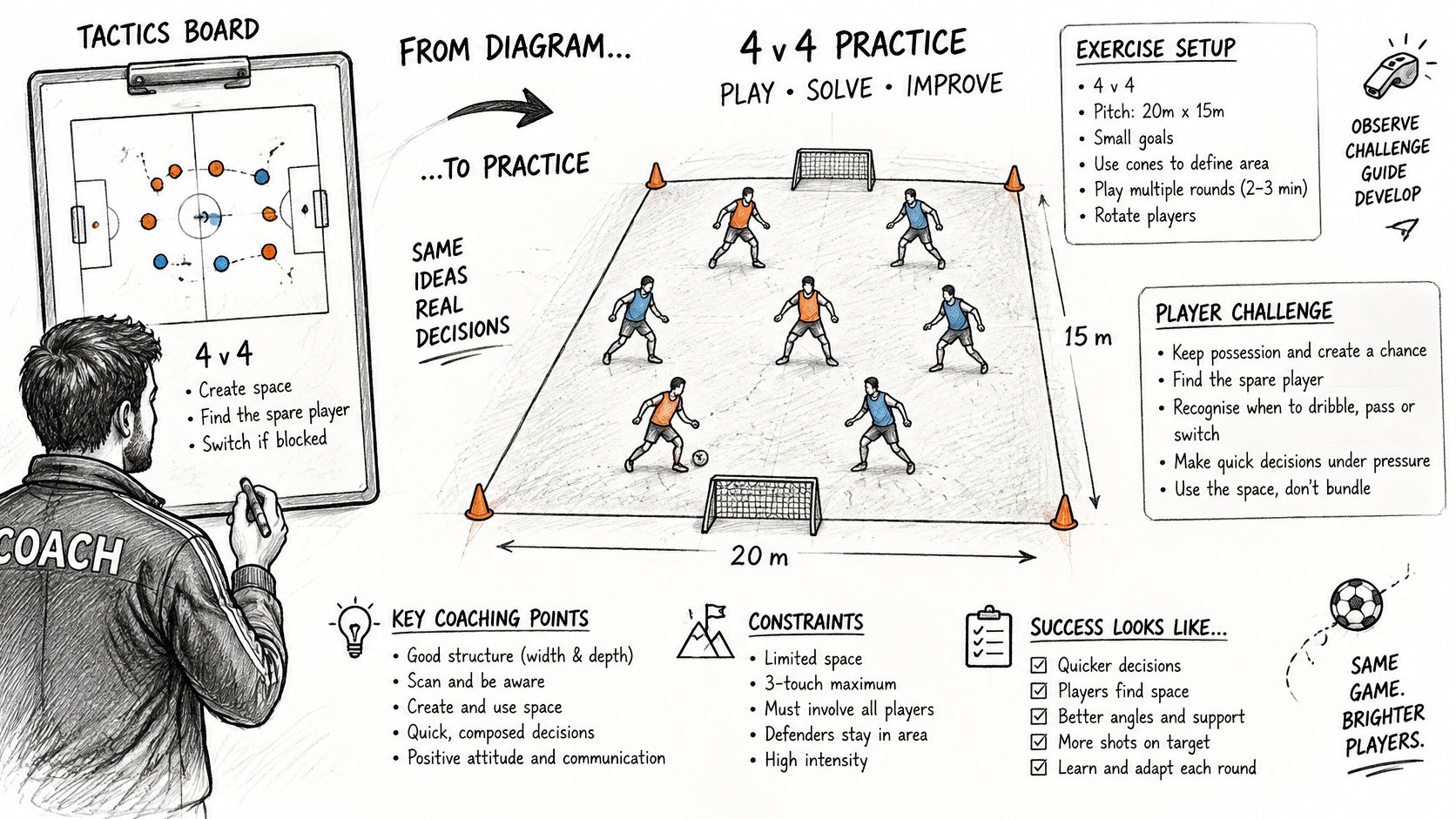
This 4v4 is a hypothetical example.
Objective. The team in possession must recognise when a forward pass is on and when to keep the ball.
Setup. Two teams of four, one ball, a rectangular area and two target goals. Mark the distances between the ball carrier, a supporting player and the target so the picture matches the pitch.
Cues. Scan before receiving, create a passing angle, and move straight after the pass.
The FA's plan, do, review guidance asks for realistic, game-related practices, frequent decisions, transition where possible, and at least 70% ball-rolling time. Show the diagram briefly, then get the ball moving.
Progression. Change one variable at a time, as The FA's guidance on building a challenging session sets out in the STEP levers of space, task, equipment and players. Narrow the area to add pressure. Add a neutral for an overload. Reward a goal after a split pass. Or give one team a numerical advantage. For less experienced players, enlarge the area or add a neutral. For advanced players, shrink the space or add a transition target after a loss. Label each version on the board so the objective and the constraint stay distinct. Record one behavioural count, such as successful forward passes, before changing anything.
Small-sided pitch formats need membership. On the free board the full-size pitch is available, so a 4v4 idea may have to be redrawn onto a smaller area by hand.
What the area size doesn't prove
Pick the smallest format that still exposes the tactical problem, and state the measure before the first whistle.
A review of youth soccer interventions reported the most consistent physical benefits with 3v3 on roughly 20×25 to 27×36 m areas and 4v4 on roughly 30×35 to 30×40 m areas, run 3–5 times a week for at least a month. Those studies mainly measured physical performance and didn't establish tactical learning over time. Smaller formats can raise involvement and still strip out the distances the full-team idea needs. Conditioning isn't the same as the decision.
Brief the Team Before the Session Starts
The board is a briefing tool. The test is whether players can answer the question without the coach talking. Knowing the shape and playing the right action aren't the same thing. Youth football research on tactical knowledge separates declarative knowledge, knowing what a tactic is, from procedural knowledge, choosing an action in the game. A tidy diagram can teach the first and miss the second.
The routine below is an example of a briefing method, not a script.
Show one decision. Pick the choice from the practice and show only the phase that contains it. Use positions, the ball, arrows and a single note. Leave every unrelated arrow off the diagram.
Ask before telling. Who receives? Where is the next pass? What tells you to switch? Let players read the shapes and team colours themselves.
Hand the board over. Print the PNG on A4 for the changing room, or open it on a tablet at the side of the pitch. Two players move the numbers to show their answer while the rest challenge it.
Freeze once. Run the first five minutes, stop at the decision, and ask the same question.
Count the action. Record the behavioural count agreed in the plan, such as successful forward passes or switches, and set it against what the board intended.
If the answers match the picture and the count doesn't, the diagram explained the idea and the practice didn't yet produce it. Change the constraint, not the drawing.
Build Your First Board Before Your Next Session
Pick one decision from the next session. Build it on the free core, write a coaching note for each phase you can show, export a PNG for the handout, and run the practice once. Record one behavioural count and compare the board with what happened.
Membership is worth it only if the next board needs a small-sided format, several phases, video export or a share link. The coaching article on switching play is one worked example of turning a diagram into a practice. The coaching blog offers practical coaching ideas, tactical frameworks and session-design guidance. Try the free board at the tactics board, and check prices and access on the live site before subscribing.
TFA Tactics Board is a browser-based planning board for formations, passes, runs and coaching notes, with PNG export on the free board and phases, small-sided pitches and sharing on membership. Use it to pin one decision to a practice, then see whether players can answer it on the pitch. Open TFA Tactics Board and build that first diagram before the next session.